Microsoft Semantic Kernel: Orchestrating AI Workflows
Learn how Microsoft Semantic Kernel transforms isolated LLM calls into orchestrated AI workflows by coordinating reasoning, plugins, memory, and application logic.
🚀 AI Systems Are More Than Connected Components
In the previous article, we explored the core building blocks of Microsoft Semantic Kernel, from the Kernel itself to Plugins, Memory, AI Services, and Orchestration.
Understanding these components individually is important—but architecture is not defined by its parts. It is defined by how those parts collaborate to achieve a business goal.
Consider a car.
Knowing the purpose of the engine, steering wheel, and transmission does not explain how the car behaves on the road. Each component has a specific responsibility, but value emerges only when they operate as a coordinated system.
AI applications follow the same principle.
A production-ready AI system is not built by connecting a language model to a prompt. It is built by coordinating reasoning, context, application logic, and external capabilities into a structured workflow.
That is where Semantic Kernel delivers its real value.
It shifts our perspective from understanding individual components to understanding how complete AI systems execute work.
The rest of this article explores how that execution actually happens.
🎯 What You'll Learn
By the end of this article, you will be able to:
- Understand how Semantic Kernel coordinates an AI request from start to finish.
- Visualize the execution flow inside an AI application.
- Explain why Semantic Kernel is considered an orchestration layer.
- Differentiate between reasoning and execution responsibilities.
- Think about AI applications as software systems instead of prompt pipelines.
🚀 From Prompt Flow to Workflow Thinking
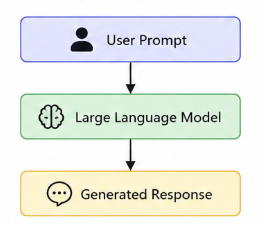
Most developers begin building AI applications with a straightforward execution model. A user submits a prompt, the application sends it to a Large Language Model (LLM), and the generated response is returned to the user.
For experimentation, this architecture is remarkably effective. It is easy to understand, quick to implement, and ideal for prototypes.
However, enterprise AI applications rarely solve problems with a single model invocation. Business requests usually require multiple coordinated activities before a meaningful response can be produced.
🚀 The Architecture Begins with a Goal, Not a Prompt
One of the most subtle—but most important—changes in AI engineering is replacing the idea of a prompt with the idea of a goal.
A prompt is simply text sent to a language model, while a goal represents the business outcome the system is expected to achieve.
Although the two concepts may appear similar, they lead to very different architectural decisions.
| Prompt Thinking | Goal-Oriented Thinking |
|---|---|
| “Write a good prompt.” | “Deliver the required business outcome.” |
| Focus on the model. | Focus on the complete system. |
| Optimize wording. | Design execution. |
| Response is the product. | Workflow is the product. |
When users interact with an enterprise AI application, they rarely care about prompts.
They care about results.
Whether they ask to diagnose a technical issue, create a support ticket, retrieve device information, or notify a support team, they expect the application to complete a task—not simply generate text.
This changes the responsibility of the system.
Instead of asking:
“How should I prompt the model?”
AI engineers begin asking:
“What workflow should this goal trigger?”
That single question represents the transition from Prompt Engineering to AI System Engineering.
🧠 Architecture Insight
Prompt engineering focuses on improving a conversation with the model. AI engineering focuses on designing a system that can reason, make decisions, coordinate capabilities, and safely execute business operations.
The prompt becomes just one input into a much larger architecture.
🚀 Semantic Kernel as the Orchestration Layer
Once a user expresses a goal, something must coordinate everything that follows.
This responsibility does not belong to the Large Language Model.
Nor does it belong entirely to the application itself.
Instead, this coordination happens through Semantic Kernel.
Rather than acting as another AI model, Semantic Kernel serves as the layer that organizes the interaction between reasoning and execution.
Conceptually, the architecture looks like this:
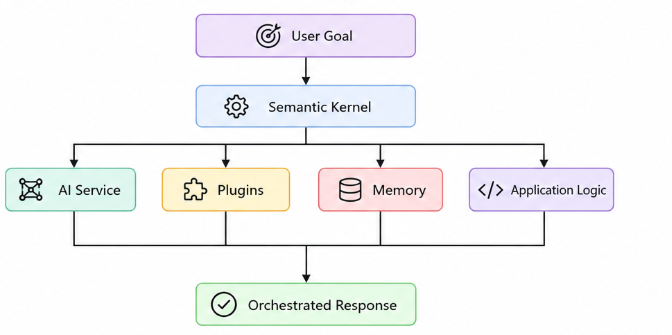
This architecture illustrates an important shift.
Rather than placing the language model at the center of the application, Semantic Kernel coordinates the interaction between reasoning and the rest of the system.
Notice what has changed compared to the traditional prompt-driven approach.
The language model is no longer the center of the architecture.
Instead, it becomes one participant inside a coordinated execution flow.
Semantic Kernel determines how the different capabilities work together, while the application remains responsible for business rules, security, governance, and user experience.
The result is an architecture that is easier to extend, easier to maintain, and significantly better suited for production environments than a collection of isolated prompt calls.
The LLM provides reasoning.
The application owns execution.
Semantic Kernel orchestrates the collaboration between them.
🚀 A User Request Starts a Workflow
Once a user submits a goal, the application enters a completely different execution model than a traditional prompt-response interaction.
The request is no longer treated as a single message sent to a language model. Instead, it becomes the starting point of a workflow that coordinates reasoning, context, and application capabilities before producing a response.
Throughout this article, we’ll follow a single business request to understand how Semantic Kernel orchestrates an AI workflow.
Consider the following request:
“My laptop keeps crashing after yesterday’s update. Diagnose the issue, create a support ticket if needed, and notify the IT support team.”
Although this appears to be a single instruction, the application must perform several coordinated activities before the task is complete.
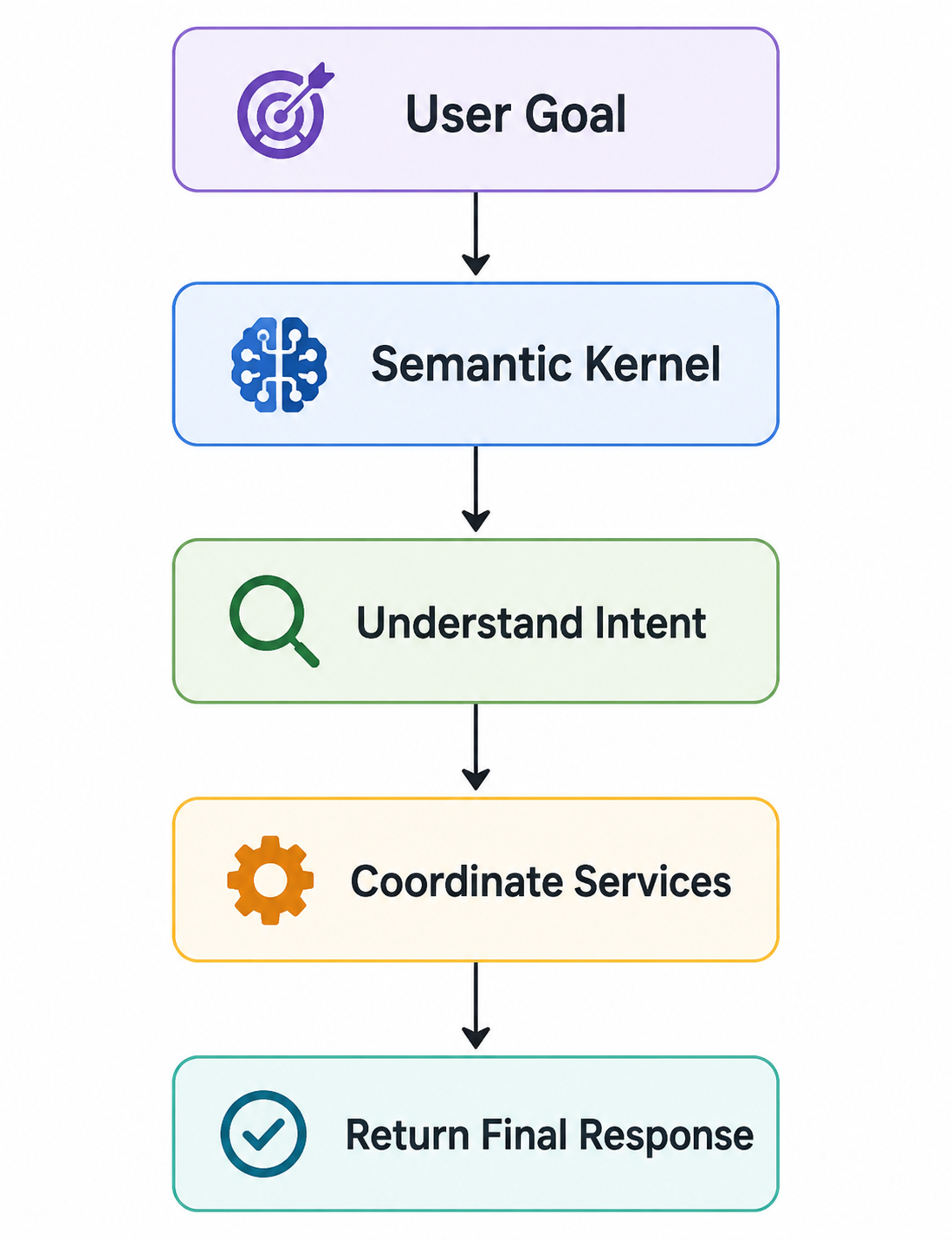
The important observation is that the workflow does not begin with the language model.
It begins with understanding the user’s goal.
Only then can the application determine what information is required, which capabilities should be invoked, and how the overall execution should proceed.
🧠 Architecture Insight
Large Language Models generate responses. AI systems execute goals. Semantic Kernel orchestrates the interaction between reasoning and execution.
🚀 Orchestration Is More Than Calling an LLM
A common misconception is that Semantic Kernel simply forwards prompts to a language model.
In reality, orchestration involves coordinating multiple responsibilities before, during, and after model reasoning.
Rather than asking only “What should the model answer?”, the application also needs to answer questions such as:
- What is the user trying to accomplish?
- Does this request require external information?
- Should an application capability be invoked?
- Is additional context required?
- Has the workflow completed successfully?
These decisions transform an isolated model call into an orchestrated execution flow.
| Traditional Prompt Flow | Orchestrated AI Workflow |
|---|---|
| Send prompt | Understand user goal |
| Call the model | Coordinate multiple capabilities |
| Receive response | Execute workflow steps |
| Return output | Deliver a business outcome |
Notice that the language model is only one participant in this process.
The application remains responsible for deciding how work should be executed.
🚀 Following an AI Request Through the System
The easiest way to understand Semantic Kernel is to follow the lifecycle of a single request.
Every execution follows the same high-level pattern, regardless of the complexity of the application.
Step 1 — Capture the Goal
The workflow begins when an employee submits the following request:
“My laptop keeps crashing after yesterday’s update. Diagnose the issue, create a support ticket if needed, and notify the IT support team.”
At this stage, the application focuses on understanding the business goal rather than generating an immediate response.
Step 2 — Build the Execution Context
Before reasoning begins, the application prepares the execution context.
For this request, that context may include:
- device information
- recent Windows updates
- previous support history
- internal troubleshooting documentation
- available application capabilities
Providing this information enables the language model to reason with relevant context instead of relying solely on the user’s message.
Step 3 — Reason About the Request
The language model analyzes the request and determines what needs to happen.
Rather than immediately generating troubleshooting advice, it recognizes that resolving the issue may require several coordinated activities, including retrieving diagnostic information, deciding whether escalation is necessary, and preparing the next execution step.
Step 4 — Coordinate Capabilities
The Kernel now coordinates the capabilities required to complete the request.
For example, the workflow may retrieve diagnostic information, create a support ticket, and notify the IT support team before continuing to the final response.
“The LLM decides which capability to use, but the Kernel and application execute the actual logic.
Step 5 — Produce the Final Response
After all required activities have completed, the application prepares the final response.
The employee receives a concise update explaining the likely cause of the issue, confirming that a support ticket has been created, and indicating that the IT team has been notified.
Although the interaction appears to be a single conversation, the application has coordinated multiple reasoning and execution steps behind the scenes.
🚀 Why This Architecture Matters
Separating reasoning from execution provides architectural advantages that become increasingly important as AI applications grow.
Instead of embedding application behavior inside prompts, responsibilities are distributed across well-defined layers.
This makes the system easier to maintain, test, secure, and extend over time.
| Without Orchestration | With Semantic Kernel |
|---|---|
| Model-centric design | Workflow-centric design |
| Prompt owns behavior | Application owns behavior |
| Difficult to extend | Easy to evolve |
| Limited reuse | Reusable capabilities |
| Tightly coupled | Modular architecture |
The result is an architecture that scales with business complexity instead of prompt complexity.
🚀 Thinking Like an AI Engineer
One of the biggest mindset shifts introduced by Semantic Kernel has nothing to do with APIs or programming languages.
It changes the questions we ask while designing AI applications.
Instead of asking:
“How can I improve this prompt?”
We begin asking:
“How should this system execute the user’s goal?”
This subtle change leads to a completely different architectural approach.
| Prompt Engineer | AI Engineer |
|---|---|
| Focuses on prompts | Focuses on workflows |
| Optimizes responses | Designs execution |
| Thinks about conversations | Thinks about systems |
| Treats the LLM as the application | Treats the LLM as one component |
The transition from Prompt Engineering to AI Engineering is not about writing better prompts.
It is about designing systems that combine reasoning, execution, and business logic into a reliable workflow. This is the mindset that Semantic Kernel was designed to support—and the foundation for building modern AI systems rather than prompt-driven applications.
💡 Key Takeaway
Semantic Kernel does not make the language model more intelligent. It makes the application more capable of coordinating intelligence with real software capabilities.
🚀 Key Takeaways
- Semantic Kernel transforms isolated model calls into orchestrated workflows.
- AI requests begin with business goals rather than prompts.
- The language model provides reasoning, while the application remains responsible for execution.
- Orchestration coordinates reasoning, capabilities, and application logic into a single workflow.
- AI Engineering is fundamentally about designing systems—not writing prompts.
🚀 What’s Next
So far in this series, we have explored:
- Why modern AI applications require more than prompts.
- The core concepts behind Microsoft Semantic Kernel.
- How those concepts work together as an AI architecture.
In the next article, we will move from architecture to implementation by building our first Semantic Kernel application.
For the first time in this series, we will write code and see how these architectural ideas translate into a working AI application.