Building Your First AI Agent with Microsoft Semantic Kernel
Build your first tool-enabled AI agent with Microsoft Semantic Kernel. Learn how a single agent retrieves external information, makes decisions, and performs controlled actions using automatic function calling.
🚀 From Architecture to Implementation
In the previous article, we explored how Semantic Kernel connects AI reasoning with plugins, application logic, and external systems.
Now it’s time to put those concepts into practice.
In this article, we will build a tool-enabled IT Support Agent that can investigate an employee’s laptop issue, retrieve device and update information, determine the likely cause, and create a support ticket when escalation is required.
This is not another chatbot demo.
The agent will use real application functions, reason over their results, and take a controlled action based on clearly defined business rules.
By the end of this article, you’ll understand how a Semantic Kernel agent reasons, invokes application functions, and performs controlled actions in a real-world workflow
🎯 What You'll Build
Throughout this article, we will build a single AI agent that can:
- Understand an employee's technical issue.
- Retrieve device information through a Semantic Kernel plugin.
- Review recent Windows updates.
- Identify the likely cause of the issue.
- Create a support ticket when escalation is required.
- Return a grounded response based on tool results.
🚀 Why Start with a Single Agent?
Multi-agent systems are powerful, but they also introduce additional complexity, including agent coordination, shared context, communication patterns, and orchestration strategies.
Before introducing that complexity, it is important to understand the core workflow of a single agent.
A single agent can already:
- Understand business goals.
- Select the appropriate tools.
- Retrieve external information.
- Reason over tool results.
- Perform controlled actions.
- Produce grounded responses.
Once these fundamentals are clear, extending the solution to multiple specialized agents becomes a natural next step.
That is why this article focuses on building one complete agent before exploring multi-agent collaboration in the next part of the series.
🚀 The Scenario
Imagine that an employee submits the following request:
“My laptop has been crashing since yesterday’s Windows update. Please investigate the issue and escalate it if necessary.”
The agent cannot answer this request reliably using the language model alone.
Instead, it first needs to retrieve the employee’s device information and recent Windows update history. Using that information, it can determine the most likely cause of the issue and decide whether IT intervention is required.
To complete the task, the agent follows this workflow:
- Retrieve the employee’s device information.
- Review the recent Windows updates.
- Analyze the retrieved information.
- Identify the most likely cause of the issue.
- Create a support ticket if escalation is required.
- Return a concise, grounded response.
This scenario highlights one of the key strengths of AI agents: combining language-model reasoning with trusted application capabilities to solve real business problems.
🚀 Solution Architecture
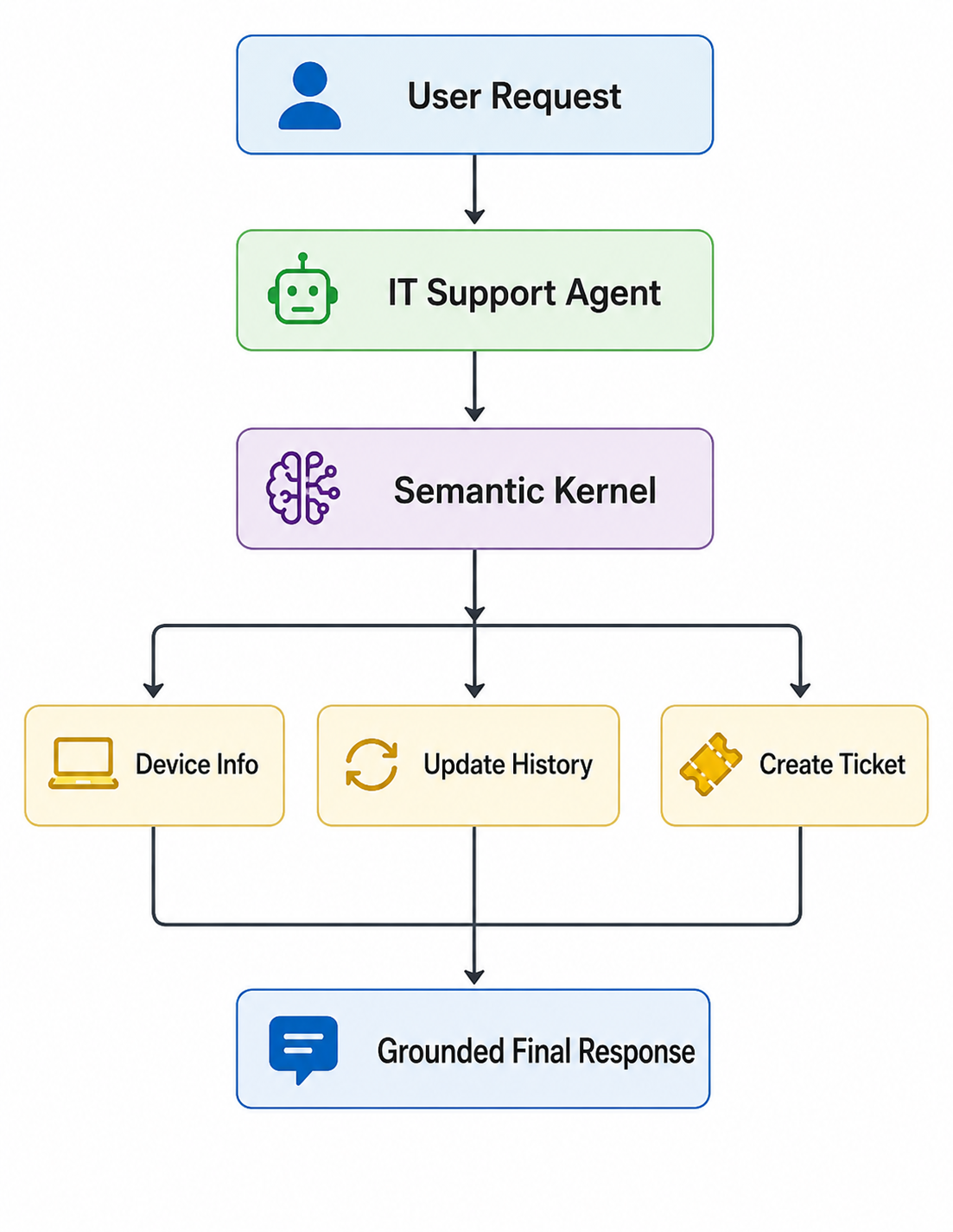
The architecture is intentionally simple so that we can focus on how an AI agent collaborates with application code.
The workflow begins when an employee submits a support request to the IT Support Agent. Rather than immediately generating a response, the agent determines which information it needs to complete the task.
Those capabilities are exposed through a Semantic Kernel plugin named DeviceSupport, which provides three business functions:
- Retrieve device information
- Review recent Windows updates
- Create a support ticket
When the agent decides that one of these capabilities is required, Semantic Kernel automatically invokes the appropriate plugin function, returns the result to the model, and allows the reasoning process to continue before generating the final response.
This clear separation of responsibilities is one of the core architectural principles of Semantic Kernel:
- The agent performs the reasoning.
- Semantic Kernel orchestrates function execution.
- The plugin contains the business logic.
By keeping these responsibilities independent, the solution becomes easier to maintain, test, and extend as new capabilities are added.
🧠 Architecture Insight
A Semantic Kernel plugin is not AI. It is ordinary application code that exposes business capabilities as callable functions. The language model decides when those functions should be invoked, while Semantic Kernel orchestrates their execution.
🚀 Project Structure
The demo is intentionally small and contains only the files required to build and run the agent.
1
2
3
4
5
6
7
semantic-kernel-single-agent/
│
├── app.py
├── device_support_plugin.py
├── requirements.txt
├── .env.example
└── README.md
The two main implementation files are:
app.py, which configures Semantic Kernel, registers the plugin, creates the agent, and runs the scenario.device_support_plugin.py, which contains the application functions available to the agent.
The remaining files provide the project dependencies, environment-variable template, and setup instructions.
Keeping the agent configuration separate from the plugin logic makes the project easier to understand, test, and extend.
Although this demo uses mocked implementations, the same plugin can easily be connected to enterprise systems such as Microsoft Intune, ServiceNow, Microsoft Graph, or any internal IT support platform.
[!TIP] Source Code
The complete source code for this demo is available in the accompanying GitHub repository.
The article focuses on the architecture and key implementation concepts, while the repository contains the full runnable project and the complete source code.
🚀 Installing the Dependencies
Before building the agent, install the required Python packages.
Create a requirements.txt file:
1
2
3
semantic-kernel
openai
python-dotenv
Then install the dependencies:
1
pip install -r requirements.txt
These packages provide everything needed for the demo:
- semantic-kernel provides the core framework for building the agent.
- openai enables communication with Azure OpenAI using the OpenAI v1 SDK.
- python-dotenv loads configuration values from a local
.envfile.
With the dependencies installed, we’re ready to configure Semantic Kernel and build our first agent.
🚀 Creating the Semantic Kernel
Every Semantic Kernel application starts with a Kernel.
The Kernel acts as the central orchestration layer that connects AI services, plugins, execution settings, and agents.
In this demo, it will:
- Register the AI service.
- Expose application plugins.
- Provide the agent with its execution settings.
- Coordinate access to external capabilities.
Creating it requires only one line:
1
kernel = Kernel()
At this stage, the Kernel is an empty orchestration container. The next step is to connect it to Azure OpenAI.
🚀 Connecting Azure OpenAI
The Kernel needs a registered AI service to process requests and support the agent’s reasoning.
For this demo, we’ll connect Azure OpenAI using the OpenAI v1 SDK.
First, create the asynchronous client:
1
2
3
4
5
6
7
8
9
10
11
12
base_url = azure_endpoint.rstrip("/")

if not base_url.endswith("/openai/v1"):
    base_url = f"{base_url}/openai/v1"

azure_client = AsyncOpenAI(
    api_key=azure_api_key,
    base_url=base_url,
    default_headers={
        "api-key": azure_api_key,
    },
)
Then register the chat completion service with the Kernel:
1
2
3
4
5
6
7
kernel.add_service(
    OpenAIChatCompletion(
        service_id="chat_service",
        ai_model_id=deployment_name,
        async_client=azure_client,
    )
)
The service_id gives this configuration a unique identifier, while ai_model_id specifies the Azure OpenAI deployment used by the agent.
Once registered, the service becomes available to the Kernel and can be used by the agent throughout the workflow.
Keeping the AI service configuration separate from the agent and plugin logic makes the solution easier to maintain and adapt to different models or providers.
🚀 Building the Device Support Plugin
At this point, our application can communicate with Azure OpenAI, but the language model still has no access to business data or application capabilities.
This is where Semantic Kernel plugins come in.
A plugin exposes application functionality as callable functions that an AI agent can invoke whenever additional information or actions are required.
For this demo, we’ll create a plugin named DeviceSupportPlugin.
Instead of connecting to real enterprise systems, the plugin returns mocked data that simulates an IT support environment. Although simplified, it demonstrates the same execution flow used in production applications.
The plugin exposes three business capabilities:
- Retrieve device information.
- Review recent Windows updates.
- Create a support ticket.
Each capability is implemented as a separate function that Semantic Kernel can automatically invoke during the agent’s reasoning process.
🚀 Retrieving Device Information
The first function provides the technical context needed to investigate the reported issue.
1
2
3
4
5
6
7
8
9
10
11
12
13
14
15
16
17
18
19
20
21
22
23
24
25
26
27
28
29
30
31
32
33
34
35
36
37
38
39
40
41
from semantic_kernel.functions import kernel_function
import json
@kernel_function(
    name="get_device_information",
    description=(
        "Retrieves the employee laptop hardware, operating system, "
        "storage, memory, and current device status. Call this function "
        "when diagnosing an employee laptop problem."
    ),
)
def get_device_information(
    self,
    employee_id: Annotated[
        str,
        "The unique employee ID associated with the laptop.",
    ],
) -> str:
    device_information = {
        "employee_id": employee_id,
        "device": {
            "manufacturer": "Dell",
            "model": "Latitude 7440",
            "device_type": "Laptop",
        },
        "operating_system": {
            "name": "Windows 11 Pro",
            "version": "24H2",
        },
        "hardware": {
            "memory": "16 GB RAM",
            "storage": "512 GB SSD",
            "available_storage": "118 GB",
        },
        "device_status": "Online",
    }

    return json.dumps(
        device_information,
        indent=2,
        ensure_ascii=False,
    )
The @kernel_function decorator exposes the method as a callable function that Semantic Kernel can discover and invoke.
Its metadata—including the function name, description, and parameter annotations—helps the language model understand:
- what the function does,
- when it should be called,
- and what information it requires.
In this example, the function returns mocked device information as structured JSON. In a production application, the same implementation could retrieve data from Microsoft Intune, Microsoft Graph, or another enterprise device-management system.
Providing structured application data allows the agent to reason using reliable information rather than assumptions.
🚀 Reviewing Recent Windows Updates
Device information alone is not enough to diagnose this issue.
Because the employee reported that the crashes started immediately after a Windows update, the agent also needs to review the device’s recent update history.
The following function provides that information:
1
2
3
4
5
6
7
8
9
10
11
12
13
14
15
16
17
18
19
20
21
22
23
24
25
26
27
28
29
30
31
32
33
34
35
36
37
38
39
40
41
42
43
@kernel_function(
    name="get_recent_updates",
    description=(
        "Retrieves recently installed Windows updates and any known "
        "issues associated with those updates. Call this function when "
        "an employee reports that a problem started after an update."
    ),
)
def get_recent_updates(
    self,
    employee_id: Annotated[
        str,
        "The unique employee ID whose update history is required.",
    ],
) -> str:
    update_information = {
        "employee_id": employee_id,
        "latest_update": {
            "knowledge_base_id": "KB5062553",
            "update_type": "Windows cumulative update",
            "installed_at": "2026-07-22T18:30:00",
            "installation_status": "Successfully installed",
        },
        "known_issue": {
            "is_known_issue": True,
            "description": (
                "Several managed devices reported crashes "
                "after installing this update."
            ),
            "affected_devices": "Multiple managed Windows devices",
        },
        "recommended_action": {
            "action": "Escalate to the Windows Support team",
            "requires_it_approval": True,
            "user_should_uninstall_update": False,
        },
    }

    return json.dumps(
        update_information,
        indent=2,
        ensure_ascii=False,
    )
Unlike the previous function, this one provides operational context in addition to technical data.
The returned information indicates that the issue is already known, affects multiple managed devices, and requires escalation to the Windows Support team.
The agent uses this information as evidence when deciding whether further action is required.
🚀 Creating a Support Ticket
The final plugin function performs an action rather than retrieving information.
When the agent determines that IT intervention is required, it invokes the following function to create a support ticket:
1
2
3
4
5
6
7
8
9
10
11
12
13
14
15
16
17
18
19
20
21
22
23
24
25
26
27
28
29
30
31
32
33
34
35
36
37
38
39
40
41
42
43
44
45
46
47
@kernel_function(
    name="create_support_ticket",
    description=(
        "Creates an IT support ticket for an employee issue that requires "
        "investigation or escalation. Call this function when a known "
        "update issue affects multiple devices, when IT approval is "
        "required, or when the remediation may risk data loss."
    ),
)
def create_support_ticket(
    self,
    employee_id: Annotated[
        str,
        "The employee ID associated with the reported problem.",
    ],
    issue_summary: Annotated[
        str,
        "A concise summary of the diagnosed technical issue.",
    ],
    priority: Annotated[
        str,
        "The ticket priority, such as Low, Medium, High, or Critical.",
    ],
) -> str:
    created_at = datetime.now(timezone.utc)

    ticket_information = {
        "ticket_id": (
            f"INC-{created_at.strftime('%Y%m%d-%H%M%S')}"
        ),
        "employee_id": employee_id,
        "issue_summary": issue_summary,
        "priority": priority,
        "assigned_team": "Windows Support",
        "status": "Open",
        "created_at_utc": created_at.isoformat(),
        "next_action": (
            "The Windows Support team will investigate the update "
            "and contact the employee."
        ),
    }

    return json.dumps(
        ticket_information,
        indent=2,
        ensure_ascii=False,
    )
Unlike the previous functions, this one performs a state-changing action by creating a support ticket.
For this demo, the ticket data is mocked. In a production environment, the same function could integrate with ServiceNow, Jira Service Management, Azure DevOps, or another enterprise ticketing platform.
The function exposes the capability, but it does not decide when a ticket should be created. That decision belongs to the agent, based on its instructions and the evidence returned by previous function calls.
This separation keeps business logic independent from the AI, making the plugin easier to test, reuse, and connect to different models or agents.
🚀 Enabling Automatic Function Calling
Before the agent can use the plugin functions, we first register the plugin with the Kernel:
1
2
3
4
kernel.add_plugin(
    DeviceSupportPlugin(),
    plugin_name="DeviceSupport",
)
Registration makes the plugin functions available to Semantic Kernel, but it does not execute them automatically.
To allow the language model to select and invoke the appropriate function, we need to enable Automatic Function Calling.
First, retrieve the prompt execution settings associated with the registered AI service:
1
2
3
4
5
support_agent_settings = (
    kernel.get_prompt_execution_settings_from_service_id(
        "chat_service"
    )
)
Next, enable automatic function calling and specify which functions the agent is allowed to use:
1
2
3
4
5
6
7
8
9
10
11
support_agent_settings.function_choice_behavior = (
    FunctionChoiceBehavior.Auto(
        filters={
            "included_functions": [
                "DeviceSupport-get_device_information",
                "DeviceSupport-get_recent_updates",
                "DeviceSupport-create_support_ticket",
            ],
        }
    )
)
The filter explicitly limits the agent to the three capabilities required for the IT support workflow.
When a request is received, the language model evaluates the available function metadata and decides which function, if any, should be invoked. Semantic Kernel then executes the selected function and returns its result to the model so the reasoning process can continue.
This removes the need to hard-code procedural rules such as:
- If the user asks about the device, call the device-information function.
- If the issue began after an update, retrieve the update history.
- If escalation is required, create a support ticket.
Instead, the language model decides what capability is needed, while Semantic Kernel controls how that capability is executed.
💡 Why Use Function Filters?
An agent does not always need access to every function registered with the Kernel. Exposing only the functions required for a specific task reduces unnecessary choices, improves reliability, and keeps the agent focused on its intended responsibilities.
🚀 Creating the IT Support Agent
With the Kernel configured, the plugin registered, and automatic function calling enabled, we can now create the IT Support Agent.
The ChatCompletionAgent brings these components together into a single executable workflow:
1
2
3
4
5
6
7
8
9
support_agent = ChatCompletionAgent(
    id="ITSupportAgent",
    name="ITSupportAgent",
    instructions=instructions,
    kernel=kernel,
    arguments=KernelArguments(
        settings=support_agent_settings
    ),
)
The most important parameters are:
- id uniquely identifies the agent.
- name provides a readable name for logging and diagnostics.
- instructions define the agent’s role, workflow, and operating constraints.
- kernel provides access to the registered AI service and plugin functions.
- KernelArguments apply the execution settings, including automatic function calling.
The agent instructions define how it should approach the support request:
1
2
3
4
5
6
7
8
9
10
11
12
13
14
15
instructions = """
You are an IT support agent.

Follow this workflow:

1. Retrieve device information.
2. Review recent Windows updates.
3. Determine whether the issue is update-related.
4. Create a support ticket only if escalation is required.

Rules:
- Never invent device information.
- Base your conclusions only on plugin results.
- Never recommend uninstalling an approved update.
"""
These instructions guide the agent through a consistent investigation process while ensuring that its conclusions remain grounded in trusted plugin results.
Notice that the instructions define what the agent should accomplish, not how the underlying operations are implemented. Retrieving device data, reviewing updates, and creating tickets remain the responsibility of the plugin.
At this point, the agent has everything it needs to analyze a user request, select the appropriate functions, perform controlled actions, and generate a grounded response.
🚀 Running the Agent
With the agent fully configured, interacting with it requires only a single method call.
1
2
3
4
5
response = await support_agent.get_response(
    messages="My laptop became slow after yesterday's Windows update."
)

print(response)
Although the application makes a single API call, much more happens behind the scenes.
When the request is received, the language model analyzes the user’s message and determines whether additional information is required. Based on the available plugin descriptions, it selects the appropriate function, Semantic Kernel executes it, and the returned data is fed back to the model.
If more information is needed, the process repeats until the model has enough evidence to produce a grounded response.
The overall execution flow is:
- The user submits a request.
- The language model selects the appropriate plugin function.
- Semantic Kernel executes the function.
- The function returns structured application data.
- The model evaluates the returned information.
- Additional functions are invoked if required.
- The model generates the final response.
From the application’s perspective, this entire workflow is represented by a single method call, while Semantic Kernel orchestrates the interaction between the language model and the registered plugins.
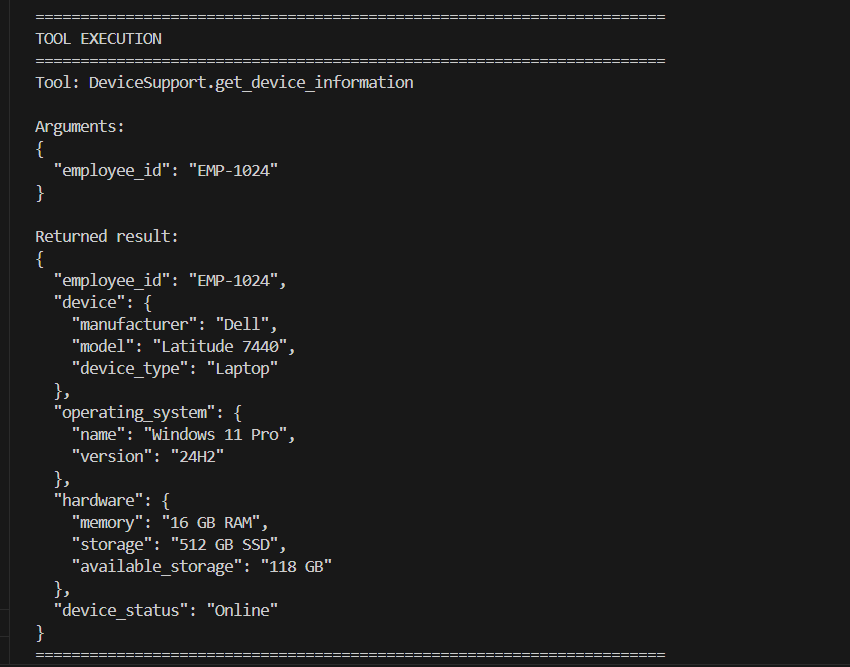
The console output below shows the automatic function calls performed during the agent’s reasoning process.
🚀 Conclusion
In this article, we moved from Semantic Kernel architecture to a working, tool-enabled AI agent.
The agent investigated an employee’s laptop issue, retrieved trusted application data through plugin functions, analyzed the results, and created a support ticket when escalation was required.
Rather than hard-coding each step in the application, we allowed the language model to decide which capability was needed, while Semantic Kernel orchestrated the function calls and returned their results to the agent.
Although the demo uses mocked data, the same architecture can integrate with enterprise platforms such as Microsoft Intune, Microsoft Graph, ServiceNow, Jira Service Management, Azure DevOps, or internal business APIs.
The key principles remain the same:
- Keep business logic inside plugins.
- Let the agent focus on reasoning and decision-making.
- Use Semantic Kernel to control and orchestrate function execution.
- Ground the final response in trusted application data.
By separating reasoning from application logic, the solution becomes easier to test, maintain, and extend as new capabilities are introduced.
In the next article, we’ll build on this foundation and explore how multiple specialized agents can collaborate to solve more complex workflows using Semantic Kernel.
The journey from a single agent to a multi-agent system starts here.